 Linked In
 Skype
Skype Facebook
 FeedBurner
 Twitter
Linked InSkypeFacebookFeedBurnerTwitterFuelFinder is an android application created with the express purpose of saving you money. Using Dijkstra's algorithm, Fuel Finder finds the cheapest gas for you to buy by factoring in travel cost as well as gas price!
Check it out and test it on your device:
https://github.com/napaunderground/FuelFinderFuelFinder requires few steps before finding you fuel! Most importantly, make sure GPS services are online on your device and you are connected to a network.
Next, you need to input a vehicle name (This is simply an identifier for your vehicle!), and the vehicle's corresponding miles-per-gallon.
Select "Find me Fuel!" in order to bring you to the Station Selection Screen. At the station selection screen, you are presented with the four cheapest-total-cost gas stations in an area around yourself, information on each station, as well as a minimap showing the location around each one. Clicking on the large "Best Cost", "2nd best cost", etc. will bring you to a routed map from your current position to the gas station by road.

station select screen
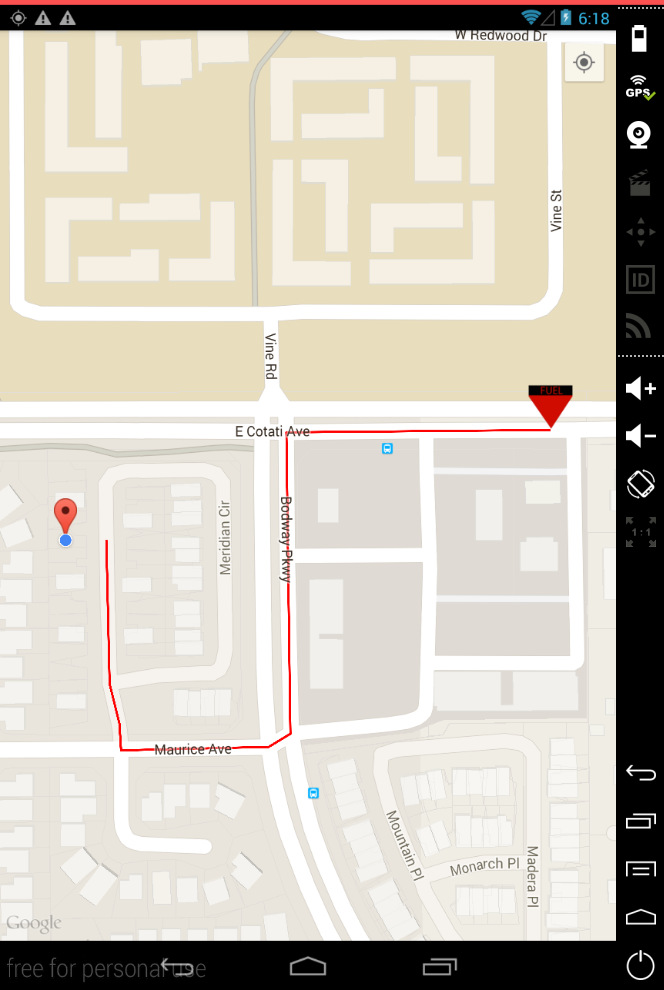
routing screen
Otherwise, you can add new vehicles or select the other option to route you immediately to the cheapest gas and withhold the 2nd, 3rd, and 4th best priced stations.
Consider a simple graph where you have a start state, where your fuel tank is empty, and a final state, where you have purchased fuel. Now, consider a column of nodes between the starting and ending state. Each of these nodes represents a gas station. The edge to the node will be the cost incurred from driving to the station, and the edge to the "filled vehicle" node will be the cost of buying fuel at the station. Therefore, Dijkstra's algorithm can manipulate this graph and output the "shortest path", or least cost, to refuel your vehicle.

I have experience working in biomedical R&D and a huge interest in AI. I'm a pretty easy going guy, but I'm also a total workhorse - the more work I have, the happier I am. I enjoy a variety of activities.

Copyright © 2014 - All Rights Reserved - nshively.com